You built a website, and it’s ready to go live, but the issue is that it’s taking too long to load in the browser. Slow page speed on your website negatively impacts the user experience and can lower your business’s overall revenue. Users have a short attention span, and if your site is not loading quickly, they have other websites of the same interest to go to.
According to the SEO industry, slow page speed can also impact your website’s ranking on search engines.
If your website takes more than 3 seconds to load, there is a very high likelihood that users will move on to your competitors without giving it a second thought.
The number of internet users is skyrocketing, and competition in the digital marketplace is intensifying. This is making it a little challenging for different organizations to differentiate their businesses from their competitors. One of the best ways to do so is to provide a fast and secure browsing experience for users.
If a website’s page load speed is not up to the mark, it can lead to issues like a higher bounce rate and fewer page views. Page speed is considered one of the significant ranking factors in SEO. But no need to worry, as you can improve your website loading speed after following the updated guidelines.
According to Google’s guidelines, a website should load within two seconds or less on both mobile and desktop. Not many websites follow the recommended guidelines.
This article explains how you can achieve a score close to 100/100 on Google PageSpeed Insights. You will get a complete breakdown of how to improve your website’s loading speed with practical explanations.
What is Google’s “Speed Update” Algorithm?
In 2019, Google announced a significant change to its mobile ranking factors. They call it “speed update,” and it has impacted a large portion of search queries. Because of the update, websites with slow load speeds are experiencing a decline in their SEO rankings.
Google still needs to confirm whether the update is temporary or permanent, but let’s assume it’s here to stay. Within the SEO community, it’s well known that website page speed has been considered a ranking factor since 2009.
According to SEO experts from around the globe, this page speed algorithm change is currently only affecting the mobile version. Google has yet to officially confirm this.
Since 65% of Internet users use mobile devices to search for products and services, this could explain the mobile-first rollout.
You can even check for yourselves, websites with slow loading speed rank better on desktop than on mobile devices for the same search terms. Some exceptions include sites with a great user experience.
Those sites continue to rank higher. If you strive to rank your website on the first page of Google, you must start improving its page speed score.
What are Core Web Vitals?
Google recently launched Core Web Vitals guidance to improve web page performance.
Google focuses on user experience and is committed to improving page speed, mobile-friendliness, secure browsing, HTTPS, and intrusive interstitials.
That’s why Google has provided numerous tools over the past few years to improve a website’s performance and help it comply with its standards.
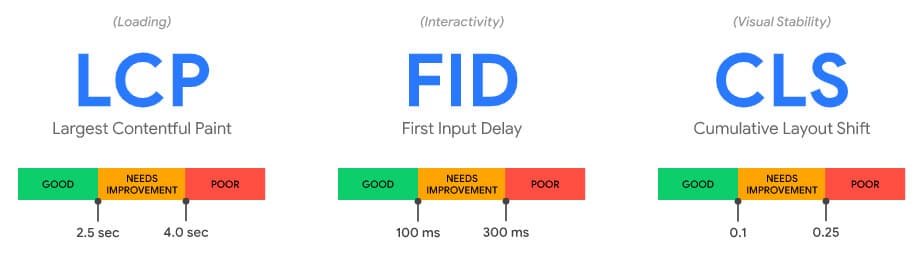
Core Web Vitals is an initiative of Google to improve performance – loading, interactivity, and visual stability – and deliver a great user experience.
- Largest Contentful Paint (LCP): measures loading performance.
- First Input Delay (FID): measures interactivity.
- Cumulative Layout Shift (CLS): measures visual stability.
According to the new guidelines, LCP should complete within 2.5 seconds, FID should be less than 100 milliseconds, and CLS should be less than 0.1.
With Google Search Console, you can check the performance of your website’s pages. Overall, it is a search signal for user experience.
How To Check Google PageSpeed Score?
Google allows you to check website page speed using Lighthouse or PageSpeed Insights and measure performance so the site can be improved. It also guides how to improve performance. Google PageSpeed Insights and Lighthouse are easy to use.
Lighthouse offers a custom report with a detailed breakdown of issues. In addition to checking your website’s score, you can also download the report to improve performance.
You can even install the Lighthouse Chrome extension in your browser to use it.
Let’s get started to learn how to test a website page speed score-
Google PageSpeed Insights Score:
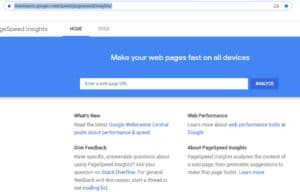
- Open your web browser.
- Put this link (Google Pagespeed) in the search bar
- Now copy your website URL and paste it into the field.
- Click on Analyze
Google Lighthouse:
You can use the lighthouse tool in many ways. To learn more about it, follow this Google Lighthouse tutorial. Or you can download the Chrome extension for your respective browser.
How Does Website Page Speed Impact Revenue?
How much time have you invested in designing your website? Maybe a lot, but the same does not matter until the website loads within two to three seconds.
Now, the audience wants to browse more websites in as little time as possible. If your website is slow to load, get ready for a higher bounce rate.
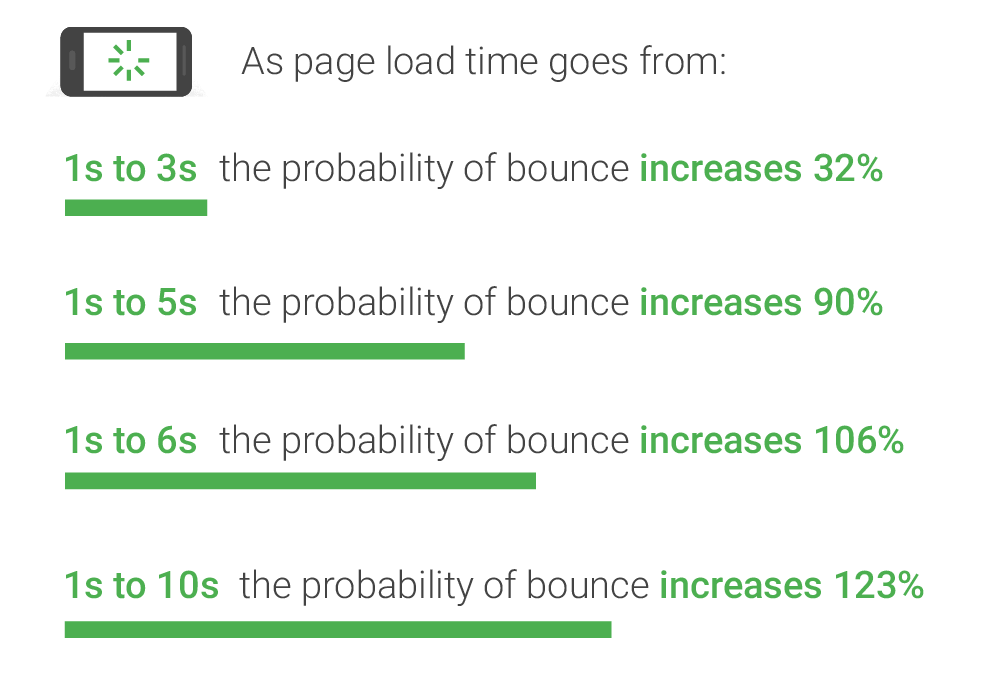
That is why it is crucial to optimize your website’s loading speed to reduce bounce rate.
If you are running a website, make sure to monitor its performance in Google Analytics. How does the audience interact with your website? What are the bounce rate, page views, page sessions, and other associated terms?
These metrics are crucial for maintaining a good user experience on your website and providing a good user experience can increase your revenue.
The slow speed of a website not only affects its ranking but also its overall conversion rate, whether it’s lead or sales conversion.
A report says that an extra second of load time costs $1.Amazon’s’s 6 billion in sales per year happened because users, instead of waiting for the site to load, moved to competitors.
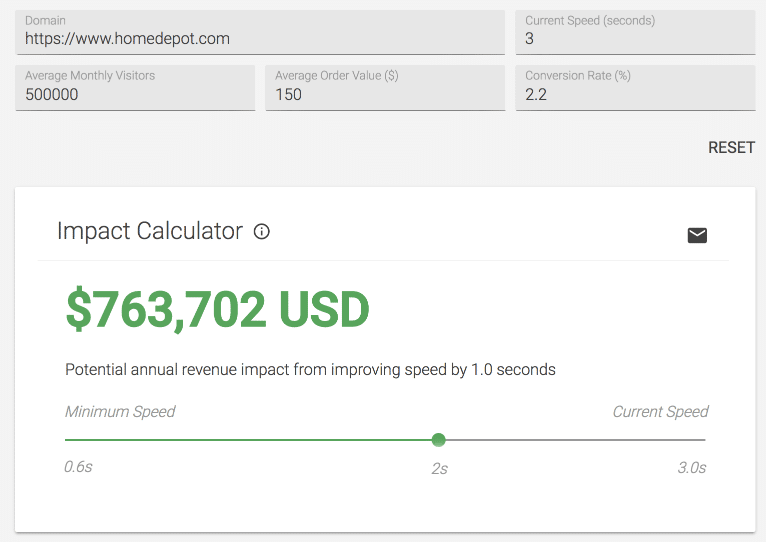
Not only with Amazon, but the same is happening with most small- and medium-sized companies across the Internet because their websites do not meet users’ expectations. As a result, those companies are losing millions of dollars in revenue every year.
What Causes Websites To Load Slowly?
Have you ever wondered why your website is loading slowly? If not, then let us tell you. There are mainly eight reasons for a website’s slow loading speed. By learning about these eight reasons, you will get to know why your website is taking more time to load.
Bulky Images:
A large number of unoptimized images can slow down your site’s speed. This happens when you upload high-quality images without reducing their size on the server. There are tools to reduce image size without losing much of the quality.
Javascript:
JavaScript makes your website pretty cool by adding interactivity, and without it, your website could look dull. But when loading the webpage, the JavaScript has to be parsed and executed before the page is rendered, which adds to load time.
The number of HTTP Requests:
Making many HTTP requests to load various resources can slow your website’s load speed.
Unminified Script:
Another reason your website’s loading speed is slow could be that the developers didn’t minify the CSS, JS, and HTML files.
Mix Content:
Even when a valid SSL certificate is installed correctly, poorly coded sites with HTTP requests to resources can become the cause for the slow loading of your website’s pages, in addition to showing as “Not Secure” inthe Chrome browser
Caching:
The HTTP protocol allows the use of various directives to hint to the browser that static files should be cached. These settings can be added to the .htaccess file on the Apache server. You could also explore using a CDN for static files like images.
Embedded Links:
A webpage with many external links has to wait for its content to fully render before the page is fully rendered. This adds a dependency on the performance of those external sites—something to keep in mind.
Hosting/Server:
Many times, an overloaded hosting server plays a significant role in slowing down your site. A worse situation could arise if the server goes down frequently. It’s advised to use a reliable server with an SLA of at least 99.9% uptime.
Improve Page Speed Using Google PageSpeed Insights
Improving Google PageSpeed is complex and needs a systematic approach. A significantly involved website owner can make many of these recommended enhancements themselves, but for a few will have to depend on the developers for help.
Optimizing the site is part of the work we do when we develop the sites. However, we also work on improving websites developed by others.
Our optimization team works around the clock to improve the speed issues on our clients’ websites and enhance the user experience so they don’t lose revenue.
Before starting the suggested improvements, make sure you have the required skills. If you don’t, it might be best to have your development team look into these.
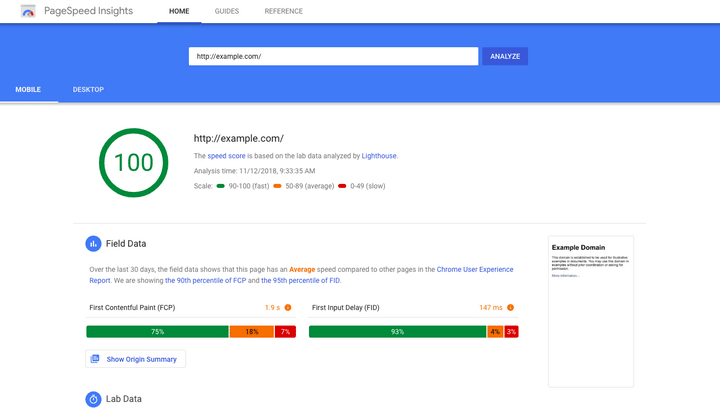
Above is the screenshot of the issues we found in Google PageSpeed Insights. You can also get these details from the lighthouse tool.
Optimize Image
Unoptimized and heavy images can slow your website’s load speed. If your website contains hundreds of heavy images, it will take longer to load in the browser, negatively impacting the overall user experience.
To optimize images, you first need to know what technology is used to design your website.
If you have used WordPress to build your site, then there are a whole bunch of plugins that you can use to optimize the size of images.
If you have a custom website, there are multiple tools you can use to optimize image size. But make sure to back up the images before optimizing their size.
WordPress Plugins you can use to optimize images:
- Imagify.
- Smush Image Compression and Optimization.
- EWWW Image Optimizer.
- ShortPixel Image Optimizer.
- Compress JPEG & PNG images by TinyPNG.
For a custom website, you can use the following tools:
- TinyPNG
- Photoshop
Serve Scaled Images
Another easy way to reduce image size is with a CSS script. You can use a CSS script to compress high-resolution images so they fit the screen.
These are some tools you can use to reduce image size.
- ShortPixel
- Smush
- Optimole
CSS Script
When you use pre-defined templates for your website, it slows the loading speed. The complex script takes more time to download, making your website sluggish.
The issue mainly occurs because the browser downloads all files synchronously, meaning one file at a time in the order they appear on the page.
Look at the image below. See how a website’s design is affected when not all files are downloaded simultaneously.
Therefore, you must use asynchronous loading for all your CSS files sotopeed upup page load timeskekeepingg the desigyct.
To make a site load faster, here is a list of changes you can make in your CSS file.
- Avoid using multiple CSS files; include them all in a single CSS file.
- Minify the Bootstrap and CSS files.
- Don’t use external CDN CSS files.
- Don’t use inline and internal CSS.
- Avoid CSS @import.
These are some points that you can avoid to make your website load in the blink of an eye. The points work the same on a WordPress theme.
JavaScript File
JavaScript files determine your site’s appearance and also contribute to the number of requests your site makes whenever a user visits it. The more requeshas,our site whas the slower it will be on the browser.
You can reduce the numbers by “minifying” and combining the files. This action, along with reducing the total number of files, also reduces the size of each file.
You can move further by removing unnecessary plugins from your website and eliminating unused JavaScript to make your site load faster.
You can identify such files by using the Chrome developer tool. Let’s see how it works.
- Press Control+Shift+J (or Command+Option+J on Mac) to open DevTools.
- Click on the Network tab.
- Select the Disable cache checkbox.
- Reload page.
Now you can see your JS files and remove those that are not helping your website’s performance.
Here are some checklists that you can use to optimize your website.
- Avoid multiple JS and jQuery files. You can use all scripts in one file.
- Minify JS and jQuery files.
- Avoid using inline scripts.
- Move small JavaScript into the header.
HTML
HTML coding is another major factor that, if done right, can help you achieve a perfect score from Google. Ensure that all the HTML files on your website are coded correctly.
Many errors may occur in your HTML files when you use custom landing pages to promote your products and services. That’s why it’s crucial to sync your HTML code with every change you make to your website.
To avoid errors, you can also follow the tips mentioned below:
- Use neat and clean HTML code.
- Don’t call external links “images” or anything.
- Use a WebP image format instead of PNGPNG.
- Use the SVG format for vector-type images.
- Avoid using table tags.
- Minify HTML
These tips work best for a custom website. For a WordPress website, you can use the WP Super Minify plugin to fix HTML coding.
Font
When it comes to improving user experience, even a nanosecond counts. Using custom fonts on your website can slow its performance in the browser.
It may make your site look good, but what’s the benefit if it’s making your customers move on to your competitors? Therefore, it is always better to avoid custom fonts and use a default set of fonts, commonly known as web-safe fonts.
To get a good score for your WordPress website, you can follow the tips mentioned below:
- Avoid using external link fonts.
- Keep the fonts file in a web folder.
- Avoid showing invisible text, use font-display: swap in your @font-face style.
Sometimes, browsers hide text until the font loads, which can cause issues. In such scenarios, you can use font-display: swap.
Mixed Content
It mainly occurs when we integrate an SSL certificate on a live website. That’s why it is always recommended to install an SSL certificate before using any insecure link (HTTP).
After installing an SSL certificate on a website, make sure the site is free from mixed content. You can use www.whynopadlock.com
to check your site for mixed content. Mixed content can impact the server because it calls a separate file to load in the browser.
Remove mixed content to get faster web page load times, better security, and provide a better browsing experience to your customers.
Caching
When you visit a website and its pages, the elements of that page get stored on your hard drive in a cache. This means that whenever you revisit the website, the browser can load it without sending another HTTP request to the server.
If you are not using cache in headers at the site level, it can significantly impact your web pages’ loading speed. But, no need to worry as you can fix the issue in the .htaccess file.
When a user requests a web page that the browser has cached, it will load faster, provided the page has not expired.EExpired headers reduce server load and decrease web page load time. You can set up expire headers to tell the browser how long you want to keep a page’s cacheLet’set install it on the server-side-
Create an .htaccess file in Cpanel in a web directory. Please copy and paste into .htaccess, then save it.
<IfModule mod_expires.c>
ExpiresActive On
# Images
ExpiresByType image/jpeg “access plus 1 year.”
ExpiresByType image/gif “access plus 1 year”
ExpiresByType image/png “access plus 1 year”
ExpiresByType image/webp “access plus 1 year”
ExpiresByType image/svg+xml “access plus 1 year”
ExpiresByType image/x-icon “access plus 1 year.”
# Video
ExpiresByType video/mp4 “access plus 1 year”
ExpiresByType video/mpeg “access plus 1 year”
# CSS, JavaScript
ExpiresByType text/css “access plus 1 month”
ExpiresByType text/javascript “access plus 1 month”
ExpiresByType application/javascript “access plus 1 month”
# Others
ExpiresByType application/pdf “access plus 1 month”
ExpiresByType application/x-shockwave-flash “access plus 1 month”
</IfM1odule>
There are multiple NS that you can use to create an .htaccess depending on the CMS version that you are using (e.g., such as WordPress, etc.).
How Does Page Speed Impact Indexing A Page?
A Web Crawler is an internet bot that analyzes the content of web pages and creates copies so they can be indexed and appear in Google’s search results.
Whenever you update the content or publish a new page, the crawler analyzes it to ensure the content is new, unique, and relevant. When a website takes longer to load in the browser, it stops the crawler from crawling your site.
That is why sometimes the page is crawled by the crawler, as it is unable to copy its content due to server issues or a slow website response.
If you are facing these issues with your website and its article, make sure that your website crawls as fast as Google recommends.
Bottom line
Google PageSpeed Insights is a breakthrough in the ranking factors. This article will help you understand how to achieve a score of 100/100 on Google PageSpeed Insights.
To get a Crawler score, it’s essential to work on a website’s page speed, mobile-friendliness, secure browsing, HTTPS, and intrusive interstitials.
Page speed has become one of the biggest challenges for agencies, but it can be overcome with the proper knowledge and technical skills.
Mobile searches are rapidly increasing, and users want a fast and secure browsing experience. If you want to improve your ranking on SERPs, it’s high time you focused on your website’s mobile version.
As per Google’s updated search algorithm, websites that deliver a slower browsing experience to their customers find it challenging to rank higher in Google’s search results. Improve your web page loading speed before its rank falls.
We at Blue Astral work passionately to improve your web performance so it can achieve a perfect score of 100/100 on Google PageSpeed Insights. If you have any questions regarding your website and its performance, we are here to help.